
The fastest way to collect tasks into Nozbe is using the add action feature or sending tasks via email. To add directly:
- Click
 or
or  (left pane).
 - Click
 (bottom right).
 - Populate
 with the task’s name.
 - Click
 or press Enter.
Quickly add more tasks (one at a time) by populating , then pressing Enter.
Add Multiple Tasks at Once, By Email
send an email to [email protected] with tasks separated by hard spaces and entered in this format: . taskname
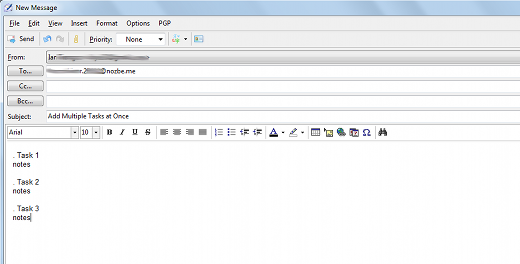
without “.“, add notes for each task by typing under it
Recent Comments