
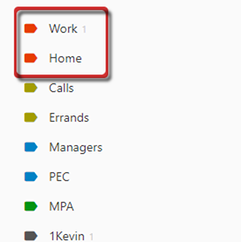
In Todoist, all contexts go together. To differentiate a major context from other context types, use  .
.
To Add a Major Context:
- Click Labels (left pane).
- Click
 (left pane).
 - Input context name in the
 field.
 - Click
 , then select
  (pop up).
 - Click
 .
.
To Arrange Contexts:
- Hover on context.
- Click and hold
 (left of context), then drag up or down.
Recent Comments